Alongside the switching signal, the sensors of a lighting control system provide two valuable data streams: energy data, which makes lighting consumption visible per zone and time period, and occupancy data, which shows when and how intensively spaces are actually used. Analysed correctly, this data lets you prove savings, detect malfunctions, plan maintenance proactively and make better decisions about space, cleaning and building services. This guide shows which data is generated, how to capture and store it, and which use cases have proven themselves in operation.
What data a lighting control system provides
A networked lighting control system generates a range of data during normal operation, without the need for additional sensors:
| Data type | Source | Typical resolution | Benefit |
|---|---|---|---|
| Energy consumption | Energy monitoring per zone, e.g. CR01-ETC | 15-minute values | Proof of savings, load profiles, reports |
| Presence events | Presence sensors in the luminaire or ceiling | event-based | Space utilisation, demand-based control |
| Dimming levels and switching states | Sensors, nodes, groups | event-based | Plausibility checks, comfort analysis |
| Daylight values | Integrated light sensors | continuous or event-based | Evaluation of daylight harvesting |
| System events | Management level, e.g. AU-Manager | event-based | Fault analysis, maintenance planning |
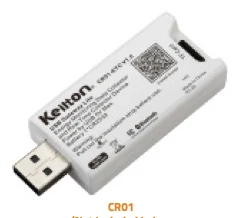
The resolution depends on the system and its configuration. For the Keilton+autani platform, the datasheets state: the CR01-ETC records a raw log of a zone's energy consumption data every 15 minutes, and the AU-Manager stores all system events for more than a year and displays real-time and historical consumption data graphically.
Energy monitoring: from meter to zone-level analysis
A central electricity meter for the lighting only shows the total. For optimisation, you need values per zone, floor or type of use. That is exactly what zone-based energy monitoring delivers.
Data capture at zone level
The CR01-ETC is a USB dongle with an integrated real-time clock that captures the energy consumption data in a Keilton+autani Bluetooth mesh zone and evaluates it for usage reports. The raw data is stored on a memory card. For sizing, the datasheet gives specific figures:
- Zones with around 100 nodes generate roughly 28 MB of data per month.
- For storage of up to two years, a card of at least 700 MB is recommended.
- The card must be formatted with the FAT32 file system.
- An integrated battery keeps the time even during a power failure, so timestamps remain consistent.
Data aggregation across the building
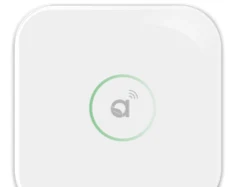
At building level, the AU-Manager bundles the data from several zones. Its web-based interface lets you adjust schedules, implement load management and display installations graphically on floor plans. This makes it easier to allocate consumption to specific areas. According to its datasheet, the AU-Manager can also include HVAC and sockets in addition to lighting, the latter being in preparation for the EU market.
Occupancy data: what presence sensors reveal about spaces
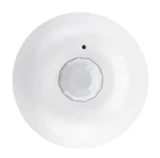
In a modern lighting control system, presence sensors sit in every room or even in every luminaire. Their events add up to a fine-grained picture of actual space usage, without any additional hardware.
Typical key figures
- Occupancy rate: the share of operating hours during which a zone is occupied
- Peak utilisation: maximum simultaneous occupancy of zones, for example on one floor
- Usage patterns: days of the week and times of day with high and low use
- Unused spaces: zones that are rarely or never occupied over several weeks
Use cases in facility management
- Space optimisation: in hybrid working models, occupancy data shows whether floors can be consolidated or spaces used differently. This is often the biggest economic lever, because rented floor space is considerably more expensive than energy.
- Demand-based cleaning: cleaning according to actual use rather than a fixed interval.
- Building services: setting back ventilation and temperature control in unused zones. This requires a connection to the building management system (BMS), see BMS integration via BACnet, Modbus and API.
- Meeting rooms: comparing bookings with actual use uncovers "ghost bookings".
Example: analysis of an office floor
The following table shows, by way of example, what a monthly analysis for an office floor might look like. The values are fictitious examples and serve only to illustrate the conclusions that can be drawn from occupancy data.
| Zone | Occupancy rate during operating hours | Observation | Possible measure |
|---|---|---|---|
| Open space north | 62 % | high utilisation Tue–Thu, low on Mon and Fri | Consider a desk-sharing concept |
| Open space south | 18 % | consistently low use | Consolidate space, switch off zone |
| Meeting rooms 1–4 | 35 % | frequently booked, rarely used | Adjust booking rules |
| Kitchenette | 41 % | usage peaks at lunchtime | Reschedule cleaning |
| Corridor | 23 % | consumption at night as well | Check schedule and hold time |
Analyses like these often lead to measures that go well beyond lighting. It is precisely the combination of occupancy and energy data that reveals where spaces are heated, ventilated and lit without being used. It is important to interpret the results together with users and those responsible for the spaces, because low utilisation can also have seasonal or project-related causes.
Predictive maintenance and fault detection
Lighting control data also helps to plan maintenance proactively:
- Unusual consumption: a zone showing consumption at night points to bypassed sensors, incorrect schedules or defects.
- Communication failures: devices that stop reporting can be checked in a targeted way before users complain.
- Operating hours and dimming levels: the actual operating time of the luminaires allows more realistic planning of replacement cycles than the blanket assumption from the luminaire datasheet.
- Battery-powered devices: for components such as the BCS107 ceiling sensor or the WP108E wall switch, battery changes can be planned instead of reacting to failures. The WP108E additionally indicates a low charge level with a flashing red LED.
Data protection and co-determination
Occupancy data from presence sensors is generally anonymous, as PIR sensors do not record images and do not identify individuals. Nevertheless, you should bear a few points in mind (not legal advice):
- Granularity: in single offices or at fixed workstations, occupancy data may be attributable to individual people. Data protection requirements may then apply.
- Co-determination: technical equipment suitable for monitoring the behaviour or performance of employees may be subject to co-determination by the works council. Involve the works council and data protection officers at an early stage.
- Purpose limitation and aggregation: analyse occupancy data at zone or floor level and set out the purpose, retention period and access rights in writing.
Data and regulatory requirements
Energy data is also becoming increasingly relevant from a regulatory perspective. Depending on a company's energy consumption, the Energy Efficiency Act (Energieeffizienzgesetz, EnEfG) requires energy or environmental management systems or implementation plans. According to the BBSR information portal, the Building Modernisation Act (Gebäudemodernisierungsgesetz, GModG) requires, among other things, monitoring technology and automatic lighting control with occupancy detection for non-residential buildings with systems rated above 70 kW by the end of 2029 (as of September 2026, not legal advice). The guide GEG, EnEfG & EPBD provides an overview.
How to get started with using the data
- Define your goals: proof of savings, space optimisation, maintenance or reporting?
- Check data sources: which zones have energy monitoring, which sensors provide presence events?
- Size the storage: estimate the data volume per zone and the desired retention period.
- Record a baseline: before activating the control functions or based on historical meter data.
- Define key figures: a few meaningful values rather than a data graveyard.
- Analyse regularly: monthly reports with deviation analysis, annual review of the profiles.
The sensor finder shows which sensors are suitable for your building. For analysing existing installations, our support team is on hand to help.
Conclusion
A networked lighting control system is also a building-wide measuring system. Energy data per zone proves savings and uncovers malfunctions, while occupancy data provides the basis for space optimisation, demand-based cleaning and cross-system control. With the CR01-ETC at zone level and the AU-Manager at building level, the data is available in a structured form. What matters is clear goals, a sound baseline and a privacy-compliant concept. Get in touch via our contact page if you want to make targeted use of your sensor data.
Frequently asked questions
What data does a lighting control system provide?
Networked lighting control systems provide energy consumption per zone, presence events, dimming levels and switching states, daylight values and system events. From these, you can derive proof of savings, space utilisation and maintenance requirements without installing additional sensors.
How much storage does energy monitoring need?
For the CR01-ETC, the datasheet states around 28 MB per month for zones with about 100 nodes. For up to two years of storage, a FAT32-formatted card with at least 700 MB is recommended.
Is occupancy data from presence detectors compliant with data protection rules?
PIR sensors do not record images or identify individuals, so the data is generally anonymous. In single offices, however, it may become personal data. Analyse at zone level and involve data protection officers and the works council at an early stage.
Can presence sensors count people?
No, PIR-based presence sensors detect whether a zone is in use, not how many people are present. This is often sufficient for utilisation analyses. Exact people counting requires other technologies.
What does predictive maintenance mean for lighting?
Analysing operating data to plan maintenance proactively: for example, unusual night-time consumption, communication failures of individual devices or upcoming battery changes. This means faults are fixed before users notice them.